I still remember the day I first dissected a JWT (JSON Web Token). eyJhbGciOiJIUzI1NiIsInR5cCI6IkpXVCJ9 — three segments separated by dots. When I Base64-decoded the first one, {"alg":"HS256","typ":"JWT"} appeared. Isn't this some kind of encryption? That was my first thought. It wasn't. The data was simply represented in a different form.
In this post, I'll cover the origins and mechanics of Base64, the differences between its three variants, the pitfalls you'll encounter in production, and the Data URL technique for embedding images directly in code. Using the Base64 Encoder/Decoder I built alongside this article will make everything click much faster.
The Birth of Base64: An Era When Binary Had to Be Sent as Text
In the early 1980s, Internet email systems could only transmit pure 7-bit ASCII text. To attach binary files—images, executables—to an email, they had to be converted to text first. The deeper problem was that some SMTP servers stripped the 8th bit (the high bit) or interpreted certain control characters differently. Binary data was silently corrupted in transit with alarming frequency.
MIME (Multipurpose Internet Mail Extensions) emerged to solve this problem. Standardized as RFC 2045, MIME defined a Content-Transfer-Encoding mechanism for safely transmitting binary data, and its cornerstone was Base64.
As the name suggests, Base64 uses exactly 64 safe ASCII characters (A–Z, a–z, 0–9, +, /) to represent any binary data. Today, Base64 reaches far beyond email—you'll encounter it in JWT authentication, HTTPS certificates, web image embedding, and virtually every corner of modern web development.
Relationship with Base32 — Base64's sibling, Base32, is case-insensitive and excludes visually ambiguous characters (0, 1, 8), making it well-suited for situations where humans read and type the data directly (TOTP, 2FA secrets, etc.). The differences between the two encodings are explored in detail later in this post.
Encoding Mechanics: 3 Bytes into 4 Characters
The core idea behind Base64 is simple. Take 3 bytes (24 bits), split them into four 6-bit groups, and map each 6-bit value to one of 64 characters (2⁶ = 64). Since 3 bytes become 4 characters, the output size grows by roughly 33%.
Let's walk through the encoding of the string "Man."
Concatenating the three bytes gives 24 bits: 01001101 01100001 01101110
Split into 6-bit groups: 010011 010110 000101 101110
Converted to decimal: 19, 22, 5, 46
Mapped to the Base64 alphabet (A=0, …, Z=25, a=26, …, z=51, 0=52, …, 9=61, +=62, /=63): T, W, F, u
Final result: TWFu
When the input length is not a multiple of 3, = padding characters bring the output length up to the nearest multiple of 4. A 1-byte input produces 2 characters + ==; a 2-byte input produces 3 characters + =.
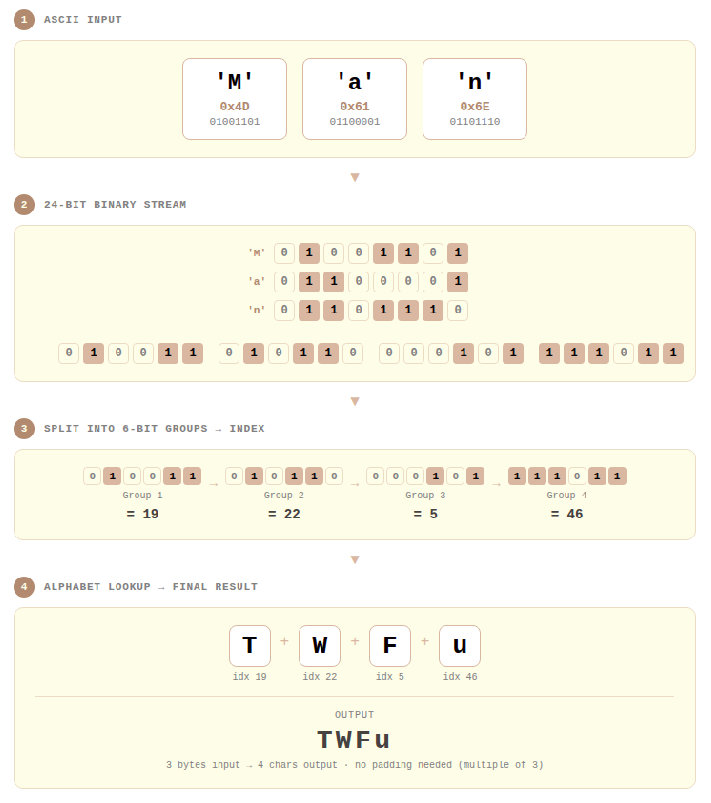
Step-by-step Base64 encoding visualization: 3 bytes split into four 6-bit groups, each mapped to one of 64 characters. Unlike Base32 (which uses 5-bit groups), Base64's 6-bit grouping results in a smaller encoding overhead.
Three Variants: Standard, URL-Safe, and No-Padding
Base64 is not a single standard. RFC 4648 defines two alphabets, and in practice a third variant—removing padding—adds to the mix, giving three forms you'll regularly encounter.
Standard Base64 (RFC 4648 §4)
The closest to the original form, using A–Z, a–z, 0–9, +, / with = padding. Traditional systems like email attachments (MIME), PEM certificates, and X.509 use this variant.
One important caveat: +, /, and = all carry special meaning in URLs. Placing a Standard Base64 string directly into a URL parameter can cause servers to misparse it.
URL-Safe Base64 (RFC 4648 §5)
Defined in RFC 4648 §5, this variant replaces + with - and / with _, making it safe for use in URLs and filenames.
This is the form you'll encounter most often in modern web development. Each section of a JWT token is encoded in URL-Safe Base64, as required by the JWT specification in RFC 7519, which mandates URL-Safe + No-Padding. OAuth 2.0's PKCE code challenge (RFC 7636) uses the same approach.
No-Padding Base64
This variant strips the = padding characters. It's less a standalone standard and more an operational style applied on top of Standard or URL-Safe Base64. The reason: = can be confused with the key=value separator in URL query strings and can cause issues in HTTP headers. Since padding can be reconstructed from the string length during decoding, no information is lost.
| Standard | URL-Safe | No-Padding | |
|---|---|---|---|
| Character set | A–Z, a–z, 0–9, +, / | A–Z, a–z, 0–9, -, _ | Same as Standard/URL-Safe |
| Padding | Uses = | Uses = | = removed |
| URL safe | ❌ | ✅ | ✅ (when combined with URL-Safe) |
| Line breaks | 76-char limit for MIME email | None | None |
| Primary use cases | MIME, PEM, X.509 | JWT, OAuth PKCE | JWT, mobile APIs |
Base64 in Production: The Hidden Foundation of Web Development
JWT and Authentication Tokens
JWT, the modern web authentication standard, encodes each of its three parts using Base64URL (URL-Safe + No-Padding). The header, payload, and signature are each Base64URL-encoded, then joined with dots (.).
There's a critical point to understand here. The header and payload are only encoded, not encrypted. Anyone can read the contents by Base64URL-decoding them. Never put passwords or sensitive personal information in a JWT payload. JWT security comes from signature verification, not from encoding.
Data URLs: Embedding Images Directly in Code
One of the most practically powerful applications of Base64 in web development is the Data URL. Defined in RFC 2397, a Data URL embeds file contents directly within the URL itself, following this structure:
The ;base64 directive is optional. Omitting it means the data is interpreted as URL-encoded text; specify ;base64 only when embedding binary files. A PNG image converted to a Data URL looks like this:
This eliminates the separate HTTP request for the image file, reducing network round trips. It's especially useful for small assets like icons, loading spinners, and small background patterns. The same technique works in CSS background-image properties.
That said, Data URLs become counterproductive as size grows. Base64 encoding inflates the size by 33%, and browser caching only works at the HTML/CSS file level—meaning large images will actually hurt performance. As a general rule, use Data URLs only for images under 10KB.
PEM Certificates and Cryptographic Keys
SSL/TLS certificates, RSA private keys, and public keys used in HTTPS are typically stored in PEM (Privacy Enhanced Mail) format. The PEM format originates from RFC 1421 and wraps actual binary data (DER format) encoded in Base64 between a header and footer:
The MIID... portion is the DER-encoded certificate represented in Base64. The 64-character line breaks commonly seen in PEM files follow RFC 1421's recommendation; for MIME email transmission (RFC 2045), 76 characters is the defined maximum. However, RFC 4648 §3.1 explicitly states that Base64 implementations MUST NOT arbitrarily insert line breaks—so the 76- or 64-character line wrapping is a rule specific to MIME email and PEM contexts, not a general Base64 rule.
Hands-On: Using the Base64 Encoder/Decoder Tool
Personally, there are two situations where I reach for the Base64 Encoder/Decoder most often: quickly inspecting JWT token payloads, and converting small images to Data URLs during frontend work. In both cases, everything is processed instantly in the browser with no additional libraries, which keeps the development cycle tight.
Exercise 1: Decoding a JWT Payload
Quickly inspect the contents of a JWT token.
- Input Settings → Direction:
Decode - Paste the second section of the JWT (the payload)
- e.g.,
eyJzdWIiOiJ1c2VyMTIzIiwiaWF0IjoxNjE2MjM5MDIyfQ
- e.g.,
- Configure Add Output settings:
- Mode:
URL-Safe - Padding:
Disabled
- Mode:
- Result:
{"sub":"user123","iat":1616239022}
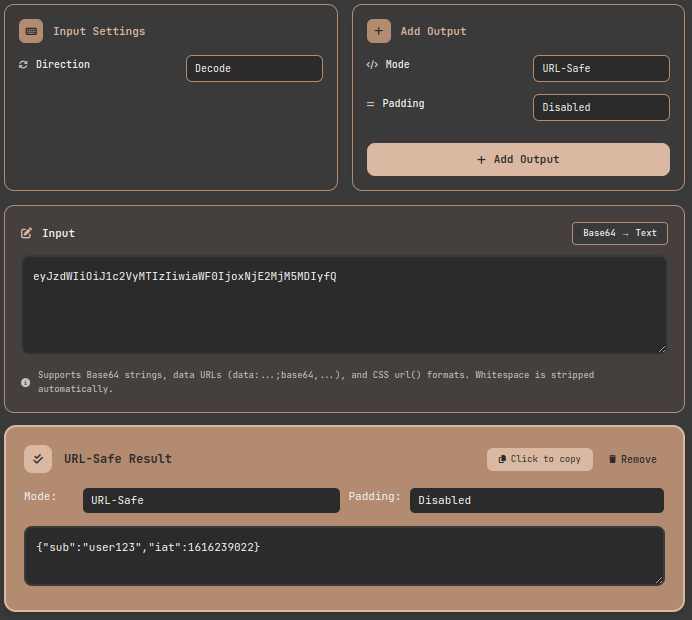
Tool exercise: Decoding a JWT payload in URL-Safe mode to inspect the internal claims. Padding-free input is handled automatically.
Exercise 2: Image → Data URL Conversion
Generate Data URLs in two formats at once for inlining images into HTML or CSS.
- Input Settings → Direction:
Encode, Input Type:File - Drag and drop the image file into the upload area
- Click Add Output twice:
- First: Mode
Standard, FormatData URL (for <img>), PaddingEnabled - Second: Mode
Standard, FormatData URL (for CSS), PaddingEnabled
- First: Mode
- HTML result:
data:image/vnd.microsoft.icon;base64,iVBORw0KGgoA... - CSS result:
url(data:image/png;base64,iVBORw0KGgoA...)
After uploading a file, the filename, size, and MIME type are displayed automatically. Supported formats include PNG, JPG, GIF, WebP, BMP, ICO, and more. Files up to 2MB can be processed.
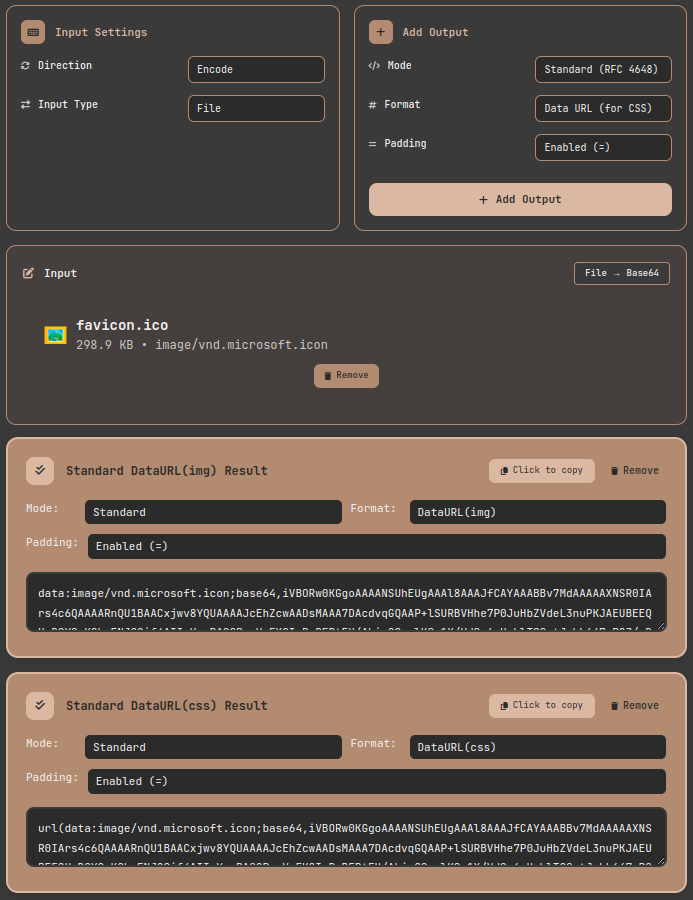
Tool exercise: Encoding a PNG image as a Data URL. Paste the result directly into an HTML img src attribute or CSS background-image to display the image without a separate file.
Exercise 3: Decoding and Saving a Base64 Image
The reverse direction is fully supported as well. Decoding a Base64 string in Data URL format renders an image preview and lets you download the file—all in one step.
- Input Settings → Direction:
Decode - Paste a string in
data:image/png;base64,...format- CSS
url()format is also parsed automatically
- CSS
- Add Output → Mode:
Standard - The image preview renders automatically, and a
Download Imagebutton lets you save the original file
Image type is detected automatically from the file header bytes (magic numbers): PNG uses \x89PNG, JPEG uses \xFF\xD8\xFF, and GIF uses the GIF89a signature.
Production Lessons: Traps and Takeaways
Trap 1: JWT Decoding Failure — Variant Confusion
The most common mistake. JWT uses URL-Safe Base64 with padding removed. Trying to decode a JWT payload with a Standard-mode decoder will produce incorrect or failed results because of the + vs. - and / vs. _ differences.
I ran into this firsthand while writing token verification code between microservices—I used Python's base64.b64decode() directly and got an error. The fix was to use base64.urlsafe_b64decode() and manually restore the padding first.
Trap 2: PEM Line Break Handling
Trying to decode a Base64 string extracted from a PEM file can fail because of embedded line breaks. PEM (RFC 1421) inserts a line break every 64 characters; for MIME email transmission (RFC 2045), the maximum is 76 characters. But as noted above, RFC 4648 §3.1 states that general Base64 implementations MUST NOT insert arbitrary line breaks—so these are PEM- and email-specific conventions, not universal Base64 behavior. Some strict decoders treat line breaks as invalid characters, so stripping all whitespace (space, \n, \t) before decoding is the safe approach. This tool strips whitespace automatically during decoding, so PEM strings can be pasted in directly without issue.
Trap 3: Encoding ≠ Encryption
As emphasized in Mastering Base32 Encoding and Decoding: From 2FA Secrets to File Encoding, Base64 is not encryption. Anyone can read a JWT payload by Base64URL-decoding it. Base64 doesn't hide data—it ensures transport safety. Sensitive data must be protected with encryption algorithms like AES-256 or RSA.
Base64 vs. Base32: Which to Choose?
Writing about Base64 naturally invites a comparison with Base32. The two encodings serve clearly distinct purposes.
| Criteria | Choose Base64 | Choose Base32 |
|---|---|---|
| Encoding efficiency | ✅ +33% (lower overhead) | ❌ +60% |
| Case-sensitive environments | ❌ Requires case distinction | ✅ Case-insensitive |
| Human-typed input | ❌ Many ambiguous characters (0/O, l/I/1) | ✅ Ambiguous characters minimized |
| Image/file transfer | ✅ Optimal | ❌ Excessive overhead |
| TOTP/2FA secrets | ❌ Risk of transcription errors | ✅ Adopted by TOTP (RFC 6238) standard |
| URL parameters | Requires URL-Safe variant | ✅ No special handling needed |
| DNS/file systems | ❌ Potential case sensitivity issues | ✅ Safe |
The rule is simple: Base64 for machine-to-machine data transfer; Base32 for data that humans need to read or type. Comparing both encodings side by side with the same input makes the difference immediately intuitive. I encourage you to experiment with the Base32 Encoder/Decoder alongside this tool.
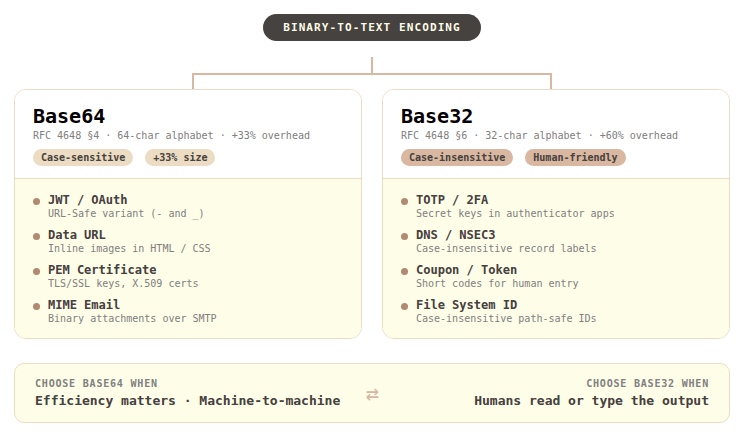
Base64 vs. Base32 use case comparison: Base64 is the right choice for efficient machine-to-machine transfer; Base32 is the right choice for codes and tokens that humans handle directly.
Base64 Implementation Across Platforms
When working with Base64 in real systems, API designs differ significantly across platforms—always verify before you code.
- Python: The
base64module supports both Standard (b64encode/b64decode) and URL-Safe (urlsafe_b64encode/urlsafe_b64decode). Padding restoration must be handled manually. - JavaScript/Node.js: In browsers, use
btoa()/atob(); in Node.js, useBuffer.from(str, 'base64'). URL-Safe conversion requires manual character substitution:.replace(/\+/g, '-').replace(/\//g, '_'). - Java:
java.util.Base64providesgetEncoder(),getUrlEncoder(), andgetMimeEncoder(), supporting Standard, URL-Safe, and MIME (76-char line breaks) formats respectively. - Go: The standard library
encoding/base64offers four variants:StdEncoding,URLEncoding,RawStdEncoding, andRawURLEncoding. TheRawvariants omit padding. - Rust: The
base64crate supports custom engines combining alphabet and padding options, enabling flexible configuration.
Each platform handles padding auto-restoration and line break behavior differently. When building cross-platform systems, always validate edge cases explicitly.
Closing: The 33% Cost, and Why It's Worth It
The bewilderment I felt the first time I dissected a JWT is long gone. Base64 is neither encryption nor compression. It's a simple, elegant contract for safely representing binary data in text-based environments. Born in email attachments, it has since woven itself through JWT, Data URLs, and PEM certificates—into the fabric of modern web infrastructure—and has held its place for decades, paying a 33% size cost as the price of admission.
Whenever you encounter Base64 in your code, or face a decision about data format, I hope this post serves as a reliable reference point. If you're unsure which variant to use, need to generate a Data URL, or want to quickly inspect a JWT token, the Base64 Encoder/Decoder lets you see the results directly. And if you're working with data that humans need to read and type themselves, take a look at the Base32 Encoder/Decoder too.
References
- IETF — RFC 4648: The Base16, Base32, and Base64 Data Encodings — Official specification for Base64 Standard and URL-Safe variants; §3.1 defines the MUST NOT rule for line breaks
- IETF — RFC 2045: MIME Part One: Format of Internet Message Bodies — Defines the 76-character line break maximum for Base64 in MIME email transmission
- IETF — RFC 1421: Privacy Enhancement for Internet Electronic Mail: Part I — Origin of the PEM format; defines the 64-character line break rule for Base64
- IETF — RFC 7519: JSON Web Token (JWT) — Specification for the use of Base64URL encoding in JWT
- IETF — RFC 7636: Proof Key for Code Exchange by OAuth Public Clients — Use of Base64URL in OAuth 2.0 PKCE
- IETF — RFC 2397: The "data" URL scheme — Data URL standard, including the structure with the
;base64directive - IETF — RFC 6238: TOTP: Time-Based One-Time Password Algorithm — TOTP standard (adopts Base32 for secret key format; Base32 itself is defined in RFC 4648)