I still remember the day I had to manually enter a Google Authenticator secret key. In an era where scanning a QR code is the norm, the environment I was in had no camera. The string on the screen was JBSWY3DPEBLW64TM — a mixture of letters and digits that had to be entered exactly right for the OTP to work. That was the first time I wondered: Why not just use numbers? Why no lowercase letters? And why this particular format?
The answer was Base32. In this post, I'll walk through the origins of Base32, its mathematical principles, the differences between its three variants, and the real-world pitfalls you'll encounter. If you want to follow along hands-on, the Base32 encoder/decoder I built will make the concepts click much faster.
The Birth of Base32: A Compromise Between Humans and Machines
Computers process data as binary (0s and 1s), but humans struggle to read or type raw binary. To bridge this gap, binary-to-text encoding techniques have evolved to convert binary data into a human-friendly text format.
The first widely adopted standard was Base64, formalized in RFC 2045 as part of the MIME specification. It uses 64 characters — A–Z, a–z, 0–9, +, and / — and encodes 3 bytes into 4 characters, resulting in only about 33% overhead. It's used extensively in email attachments, HTTP headers, JWT tokens, and more.
So why was Base32 needed? Base64's biggest drawback is that it's case-sensitive: ABC and abc represent completely different values. In environments like file systems, DNS records, and legacy terminals that treat uppercase and lowercase as identical, this causes serious problems. Human error is another factor — over the phone or when writing by hand, people frequently confuse O (the letter) with 0 (zero), I with 1, and so on.
Base32 was designed to address exactly these issues. Standard Base32, defined in RFC 4648, uses only 32 characters — A–Z and 2–7 — all uppercase letters and digits. This eliminates case sensitivity, and by excluding the digits 0, 1, and 8 (which can be confused with O, I, and B respectively), it reduces ambiguity. The trade-off is a higher encoding overhead of roughly 60%, since each character represents only 5 bits instead of Base64's 6.
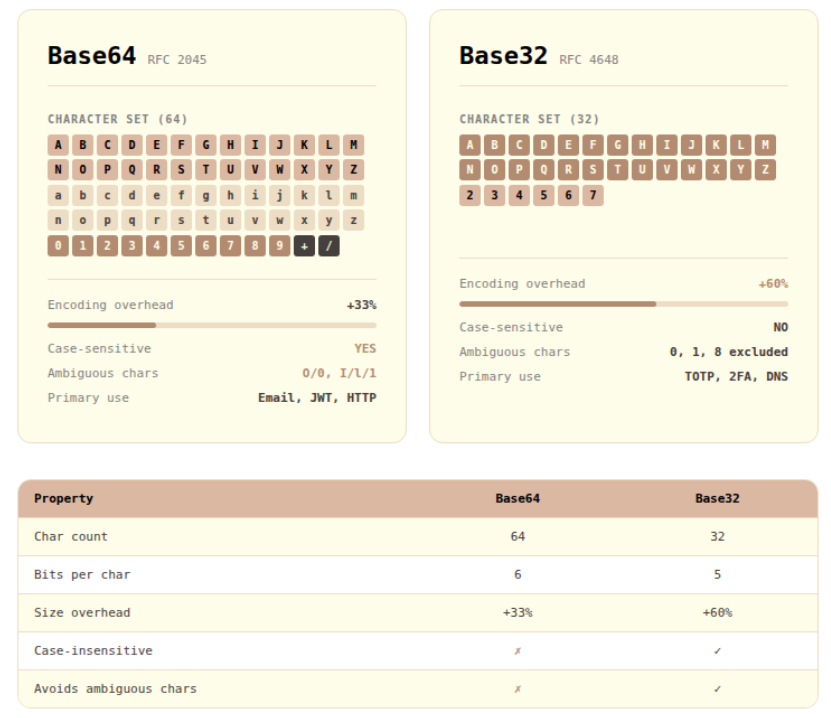
Base64 vs Base32: Base32 accepts greater overhead in exchange for case-insensitivity and minimal character ambiguity.
The Encoding Principle: Slicing into 5-Bit Groups and Mapping to 32 Characters
To truly understand Base32, you need to follow the conversion process at the bit level. The core idea is that 5 bytes (40 bits) map to 8 Base32 characters, because each Base32 character represents 5 bits (2⁵ = 32).
Let's trace through encoding the string "Hi" in Standard Base32.
Concatenating the two bytes gives 16 bits: 01001000 01101001
Split into 5-bit groups: 01001 00001 10100 10000 (last group zero-padded)
Converting each 5-bit group to decimal: 9, 1, 20, 16
Mapping to the Standard Base32 alphabet (A=0, B=1, …, Z=25, 2=26, …, 7=31): J, B, U, Q
The final result is JBUQ====. Since 2 bytes (16 bits) produce only 4 groups of 5 bits, four = padding characters are appended to complete the block.
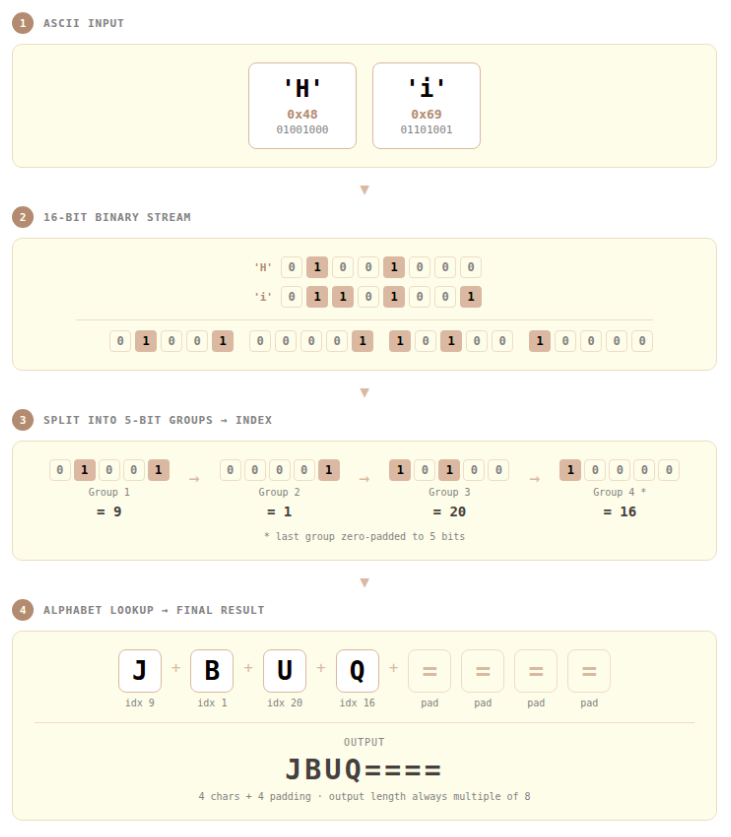
Step-by-step Base32 encoding: splitting input bytes into 5-bit groups and mapping each to one of 32 characters.
Three Faces of Base32: Standard, Hex, and Crockford
The fact that Base32 is not a single standard often causes confusion in practice. The same input can produce different outputs depending on which variant is used.
Standard Base32 (RFC 4648)
The most widely used variant, defined in RFC 4648 §6. Its alphabet is A–Z (values 0–25) and 2–7 (values 26–31). The digits 0, 1, 8, and 9 are absent — in practice, only six digits (2–7) are used to represent the 32 values. The digits 0, 1, and 8 were excluded because they can be confused with the letters O, I, and B.
Most TOTP implementations — including Google Authenticator and Microsoft Authenticator — use this variant. If you've ever handled a 2FA secret key directly, a string like JBSWY3DP... is the output of Standard Base32.
Base32 Hex (RFC 4648 Extended Hex)
Defined in RFC 4648 §7, this variant uses 0–9 (values 0–9) and A–V (values 10–31). Its defining characteristic is that it preserves bit-order sorting: if you encode two pieces of data in Base32 Hex and compare them lexicographically, the result matches what you'd get from comparing the original binary values directly. Because ASCII character codes align with bit ordering, a simple string sort gives the correct binary order. This makes it useful for database indexing and generating sortable identifiers.
Crockford Base32
Designed by Douglas Crockford — yes, the same Crockford who defined the JSON specification — this variant focuses on minimizing human error. It uses 0–9 and A–Z, but excludes the easily confused characters I, L, O, and U. During decoding, it's lenient: lowercase input is accepted, and i/l are automatically mapped to 1, while o maps to 0. It's well-suited to short IDs, coupon codes, and tokens that people read and type directly.
Crockford Base32 also does not use padding characters.
| Standard | Hex | Crockford | |
|---|---|---|---|
| Alphabet | A–Z, 2–7 | 0–9, A–V | 0–9, A–Z (excl. I, L, O, U) |
| Padding | Optional | Optional | None |
| Sort-preserving | ❌ | ✅ | ❌ |
| Ambiguous char handling | Limited | ❌ | ✅ (auto-converts) |
| Primary use cases | TOTP, 2FA | DB indexing, identifiers | Human-input tokens, coupons |
Base32 in Practice: From 2FA to File Encoding
TOTP and 2FA Secret Keys
The most common place to encounter Base32 in the wild is undoubtedly Time-based One-Time Passwords (TOTP), defined in RFC 6238. TOTP generates a 6-digit OTP by combining a secret key shared between server and client with the current timestamp. The standard representation format for this secret key is Standard Base32.
Why Base32? Because secret keys may need to be entered manually by users, or written down when QR code scanning isn't available. A format like Base64 — with +, /, and mixed case — would cause frequent input errors. Standard Base32's uppercase-only, digit-only character set dramatically reduces these mistakes.
Grouping the key into 4-character chunks (JBSW Y3DP EBLW 64TM) makes it far easier to read aloud over the phone or transcribe by hand.
File and Binary Data Encoding
When you need to safely transmit binary files through a text-only system, Base32 is a valid option. For instance, while Base64 is the norm in email, certain legacy systems process data in a case-insensitive way that corrupts Base64 output. Base32 provides a safe alternative in such cases.
DNS and Case-Insensitive Systems
DNS treats labels as case-insensitive: EXAMPLE.COM and example.com are identical. For this reason, DNS-based systems that need to encode data as DNS labels — such as DNSSEC and NSEC3 hashes — use Base32 Hex. NSEC3 (RFC 5155) is a prominent example.
Tool Walkthrough: Using the Base32 Encoder/Decoder
The scenario I personally use most often is validating TOTP system implementations. When I need to quickly confirm that a server-generated secret key matches what an authenticator app expects, the Base32 encoder/decoder is my go-to verification tool.
Exercise 1: Converting a TOTP Secret Key Format
This walkthrough converts a TOTP secret key into a form that's easy to enter manually into an authenticator app.
- Under Input Settings, set Direction to
Encodeand Input Type toText - Enter your secret source text in the input field (e.g.,
mySecretKey) - Configure Add Output settings:
- Mode:
Standard (RFC 4648) - Case:
Uppercase - Format:
4-char chunks - Padding:
Enabled
- Mode:
- Click
Add Output→ confirm output likeNV4V GZLD OJSX IS3F PE== ==== - Presenting the key in this format to users significantly reduces manual input errors in authenticator apps.
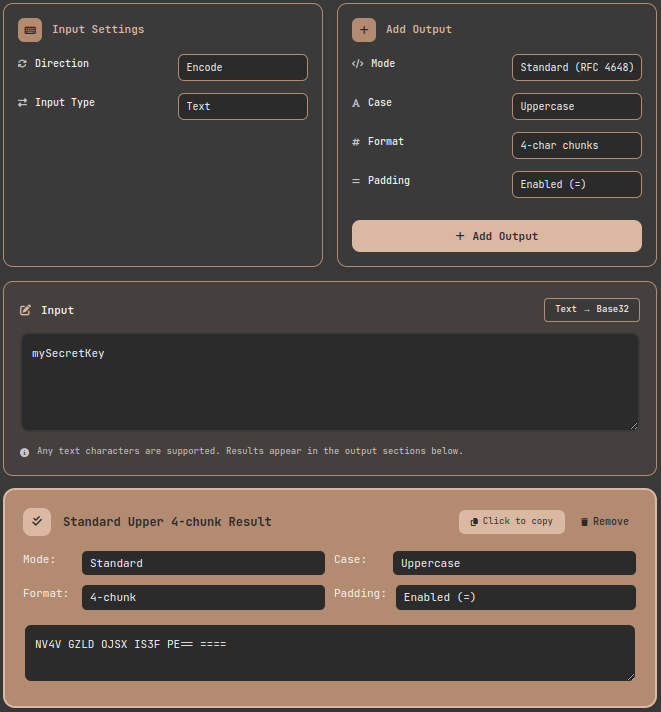
Tool walkthrough: encoding a TOTP secret key in Standard Base32 with 4-character chunk formatting for human-friendly manual entry.
Exercise 2: Comparing the Three Variants
Viewing all three variant outputs side by side for the same input is one of the tool's core features.
- Set direction to Encode and enter "Hello, World!"
- Click Add Output three times, configuring Standard, Hex, and Crockford modes respectively
- Compare the results:
- Standard:
JBSWY3DPFQQFO33SNRSCC=== - Hex:
91IMOR3F5GG5ERRIDHI22=== - Crockford:
91JPRV3F5GG5EVVJDHJ22
- Standard:
You can see directly that Crockford has no padding, and Hex uses a digit-first alphabet to enable sort preservation.
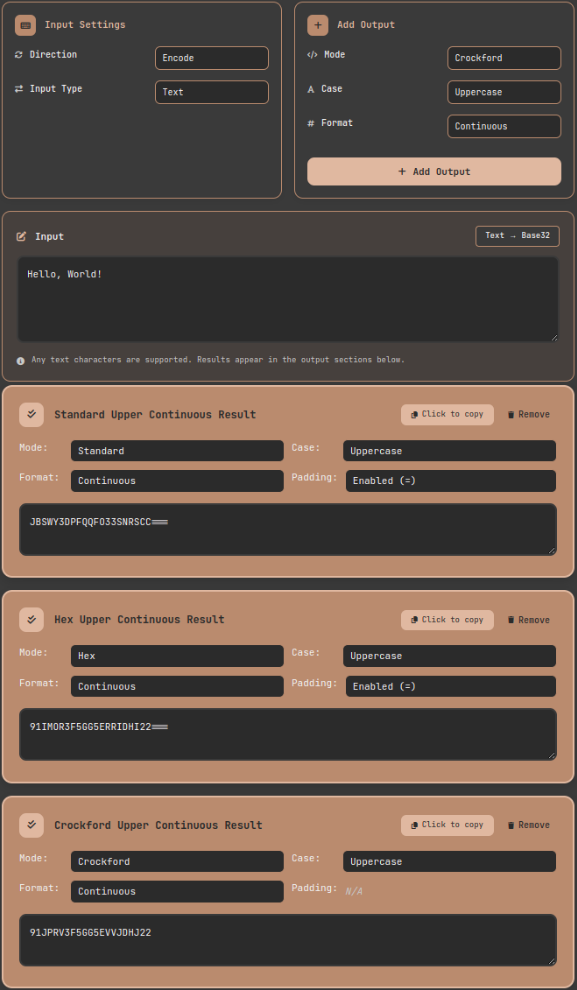
Comparing three Base32 variant outputs for the same input: differences in character sets and padding rules are immediately visible.
Exercise 3: Decoding When You Don't Know the Variant
Sometimes you receive a Base32 string with no information about which variant was used to encode it. Adding multiple decode outputs simultaneously lets you verify all possibilities at once.
- Switch Direction to
Decode - Paste the Base32 string to decode
- Click Add Output three times → add Standard, Hex, and Crockford respectively
- Identify which variant produces meaningful text
The Padding Dilemma: Should You Include =?
Padding handling is a surprisingly common source of real-world issues. RFC 4648 recommends padding but does not require it, and the right choice depends on context.
When padding is necessary:
- Streaming or concatenation scenarios where multiple Base32-encoded results are chained together
- System integrations requiring strict RFC 4648 compliance
When to omit padding:
- When including in URL parameters or cookies, since
=can cause URL encoding issues - Most TOTP implementations — including Google Authenticator — work correctly without padding
- Crockford Base32 uses no padding by specification
When implementing your own system, I recommend coding your decoder defensively to handle input with or without padding.
Lessons from the Trenches: Pitfalls and Takeaways
Pitfall 1: Variant Mismatch
If the server generates a secret using Crockford Base32 but the client library tries to interpret it as Standard Base32, decoding will fail — the character sets are different. Crockford doesn't use U, but Standard does. In one real project integrating a legacy system with a newer one, I spent considerable time debugging because one side used Python's base64.b32encode() while the other used an older Java library. Always check the exact Base32 variant in your specification first — it's step one of any debugging process.
Pitfall 2: Case Handling
RFC 4648 states that Standard Base32 should be case-insensitive. However, not every implementation follows this. Some strict decoders will reject lowercase input outright. It's safest to always normalize user input to uppercase before Base32 decoding.
Pitfall 3: Whitespace Handling
If you take a human-friendly Base32 string that uses spaces to separate 4-character groups and feed it directly into a decoder, it will fail. Always strip spaces, line breaks, hyphens, and other delimiters before decoding. This tool automatically removes whitespace during decoding, so you don't need to worry about it.
The Limits of Base32: Encoding Is Not Encryption
There's one critical point that must be addressed. Base32 — and all encoding schemes including Base64 and Hex — is not encryption. Just as a CRC is an error detection tool rather than a security tool, the same is true of Base32.
Anyone can decode Base32-encoded data trivially. The reason TOTP secret keys are stored in Base32 is interoperability, not security. The confidentiality of the secret key itself must be protected through access controls and encrypted storage (e.g., AES-256). Base32 is a representation format — it is not a mechanism to hide or protect data.
In practice, I regularly encounter the misconception that "it's encoded in Base32, so it's secure." If you're dealing with sensitive data, you must add appropriate encryption layers on top.
Base32 Implementation Landscape by Platform
When working with Base32 in real systems, you need to verify the specifics of each platform's implementation.
- Python:
base64.b32encode()/b32decode()in thebase64module supports Standard Base32. Crockford and Hex require third-party libraries. - Java: Apache Commons Codec's
Base32class supports both Standard and Hex. Widely used in Quartz and Spring-based systems. - Go: The standard library's
encoding/base32package supports both Standard and Hex. - JavaScript/Node.js: No Base32 in the standard library — third-party modules like
hi-base32orthirty-twoare needed. - RFC compliance: Libraries vary in padding handling, lowercase acceptance, and streaming behavior. When implementing cross-platform systems, always validate with edge cases to catch interoperability issues early.
Wrapping Up: One Concept, Not Five Sections
I opened this post with the memory of manually typing a Google Authenticator secret key. Behind that unfamiliar string lay decades of thought about how to make binary data manageable for humans. Like Base32's philosophy — trading away Base64's efficiency for the safety of a smaller, unambiguous character set — good engineering design often begins with clearly understanding trade-offs and making deliberate choices.
Whether you're encountering Base32 in code for the first time, implementing a TOTP system, or trying to reconcile data formats between legacy and modern systems, I recommend using the Base32 encoder/decoder to see the results with your own eyes first. The moment you see all three variant outputs side by side, abstract concepts crystallize into concrete understanding.
References
- IETF — RFC 4648: The Base16, Base32, and Base64 Data Encodings — Official specification for Standard and Hex Base32 variants
- Douglas Crockford — Base32 Encoding — Design philosophy and official definition of the Crockford Base32 variant
- IETF — RFC 6238: TOTP: Time-Based One-Time Password Algorithm — TOTP standard using Base32-encoded secret keys
- IETF — RFC 5155: DNS Security (DNSSEC) Hashed Authenticated Denial of Existence — Base32 Hex usage in DNS
- IETF — RFC 2045: MIME Part One: Format of Internet Message Bodies — MIME specification that standardized Base64 Content-Transfer-Encoding