When I first started working with automated systems, the idea that "a server cleans up data on its own every night" felt like magic. That magic had a name: Cron. A few months later, a batch job fired twice at 3 AM in production without warning. Tracing the cause led me to a collision between a DST (Daylight Saving Time) transition and a Cron schedule. From that day on, I stopped thinking of Cron expressions as "just a few asterisks."
This article systematically covers the history and structure of Cron expressions, the pitfalls every practitioner must know, and the differences between the two major Cron systems — Linux Cron and Quartz/Spring. I'll also walk through hands-on examples using a Cron Expression Parser I built myself.
The Birth of Cron: From AT&T Bell Labs to the Language of DevOps
The history of Cron is inseparable from the history of Unix. In the mid-1970s, Ken Thompson at AT&T Bell Labs first introduced periodic task execution to Unix, laying the groundwork for what would become Cron. In 1979, Brian Kernighan rewrote it as a proper background daemon for Version 7 Unix, establishing the syntax we recognize today. Then in 1987, Paul Vixie released a major overhaul — Vixie Cron — which became the de facto standard and ships with most Linux distributions to this day.

The History of Cron: From Bell Labs (mid-1970s) to Cloud-Native Scheduling (present)
Cron is far from an obsolete Unix relic. Its concepts remain foundational to modern infrastructure. AWS Lambda's EventBridge Scheduler, GitHub Actions' schedule trigger, Kubernetes' CronJob resource, Spring Framework's @Scheduled annotation — all of them use Cron expressions as their scheduling language. A concept nearly half a century old still breathes at the heart of cloud-native environments.
Five Asterisks: Anatomy of Linux Cron Syntax
Linux Cron is built on five fields.
When you first see this structure, a natural question arises: why exactly five? The answer is pragmatism. Sub-minute scheduling was rarely needed in the 1970s, and from a system resource perspective, one minute was a sensible minimum interval. (Second-level scheduling is covered in the Quartz Scheduler section.)
Special Characters: More Than Just Asterisks
Cron's expressive power comes from its special characters.
| Character | Meaning | Example |
|---|---|---|
* | Every value | * * * * * — every minute |
, | List separator | 0 9,18 * * * — at 9 AM and 6 PM |
- | Range | 0 9-17 * * * — every hour from 9 to 17 |
/ | Step / interval | */15 * * * * — every 15 minutes |
Combining these four characters allows surprisingly precise schedules. For example, 0 9-17/2 * * 1-5 means "every 2 hours from 9 AM to 5 PM, Monday through Friday."
The Day-of-Week Trap: 0 and 7 Are Both Sunday?
Linux Cron uses numbers 0 through 6 for the day-of-week field, where 0 is Sunday. However, for historical reasons, 7 is also treated as Sunday. The origin is not a POSIX standard but rather the divergence between early Unix Cron implementations — some used 0 for Sunday while others used 7, and when Paul Vixie wrote Vixie Cron in 1987, he allowed both values simultaneously to maintain compatibility with both conventions. This behavior is explicitly documented in the Vixie Cron official crontab(5) man page.
Quartz Scheduler: Entering the World of Seconds
The Java ecosystem introduced Quartz Scheduler to push past the limitations of Linux Cron. Quartz originated in the OpenSymphony project and now underlies Spring Framework's @Scheduled annotation as an enterprise-grade job scheduling library.
Quartz Cron uses 6 to 7 fields.
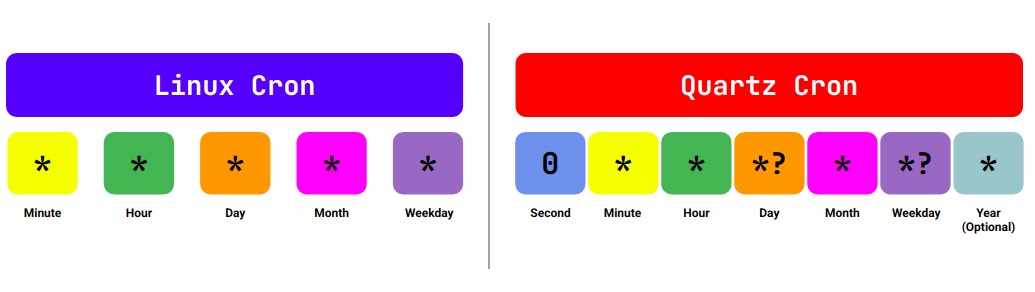
Linux Cron vs Quartz Cron: Field structure comparison — Quartz adds second-level scheduling and an optional year field
The ? Character: Quartz's Unique Rule
The most distinctive element of Quartz is the ? character. It is only valid in the day-of-month and day-of-week fields, and means "no specific value."
Why is it needed? In Linux Cron, specifying both day-of-month and day-of-week simultaneously — such as 0 0 1 * * (1st of every month) and 0 0 * * 1 (every Monday) — is interpreted as "run if either condition matches." Quartz treats these as logically conflicting, so exactly one of the two fields must be set to ?.
# Quartz: midnight on the 1st of every month → day-of-week must be ?
0 0 0 1 * ?

# Quartz: every Monday at midnight → day-of-month must be ?
0 0 0 ? * MON
Not knowing this rule leads directly to a CronExpression parse exception — one of the most common errors seen in Spring projects.
Linux vs Quartz: Key Differences at a Glance
| Feature | Linux Cron | Quartz / Spring |
|---|---|---|
| Number of fields | 5 | 6–7 |
| Second-level support | ❌ | ✅ |
| Minimum interval | 1 minute | 1 second |
| Day-of-week numbering | 0–6 (Sun=0) | 1–7 (Sun=1) or SUN–SAT |
? character | ❌ | ✅ |
| Year field | ❌ | Optional |
| Primary use cases | Linux crontab, CI/CD | Spring, Java applications |
Timezones: Cron's Hidden Trap
Among all the issues I've encountered in server automation, timezone-related failures are some of the most frequent. Cron runs against the server's local timezone by default. In cloud environments, EC2 and GCP instances often default to UTC, which means a schedule intended to run at "9 AM Eastern Time" actually fires at "9 AM UTC" — which is 4 or 5 AM ET. This is a surprisingly common production incident.
The situation becomes more complex when the US Eastern timezone shifts between EST (UTC−5) and EDT (UTC−4). When a DST transition coincides with a Cron schedule, unexpected timing errors are all but guaranteed.
DST Transitions Colliding with Cron
The trickiest scenario is a direct collision with Daylight Saving Time. The America/New_York timezone adjusts its clock twice a year.
- Spring (second Sunday in March): 2:00 AM → 3:00 AM (one hour skipped)
- Fall (first Sunday in November): 2:00 AM → 1:00 AM (one hour repeated)
If a schedule is set to 0 2 * * * (every day at 2 AM):
- Spring transition day: 2 AM doesn't exist — the Cron job never runs
- Fall transition day: 2 AM exists twice — the Cron job may run twice
The double-execution incident I mentioned at the outset followed exactly this pattern. Because most Cron implementations exhibit system-dependent behavior in these edge cases, the safest approach is to define schedules in UTC and run servers on UTC throughout.
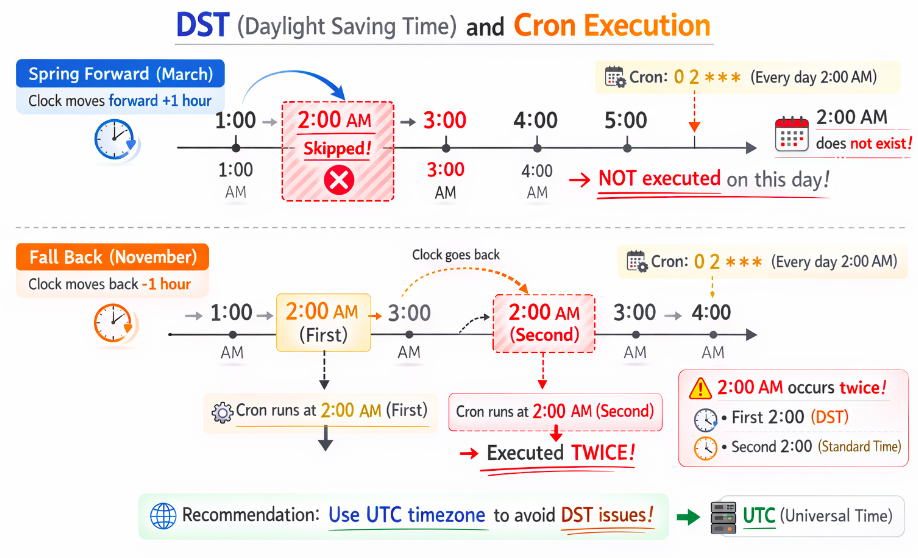
DST and Cron in Conflict: Execution skipped in spring (red), double-execution risk in fall (orange)
Practical Usage: Walkthrough of the Cron Expression Parser
One of the riskiest things you can do when writing a Cron expression is "calculate it in your head and deploy." Visually confirming the actual execution times is a non-negotiable step. The Cron Expression Parser was built for exactly this purpose — enter any expression and instantly see the next N execution times in your chosen timezone.
Example 1: Validating a Weekday Business Hours Schedule
Suppose you're setting up a schedule to send a batch report every weekday at 9 AM Eastern Time.
- Parser Settings → Cron System:
Linux Cron - Timezone →
America/New_York - Show Next Runs →
10 executions - Use the Expression Builder to set each field, or type
0 9 * * 1-5directly into the expression input - Verify: confirm that the next 10 execution times all display as weekdays at 09:00:00 ET
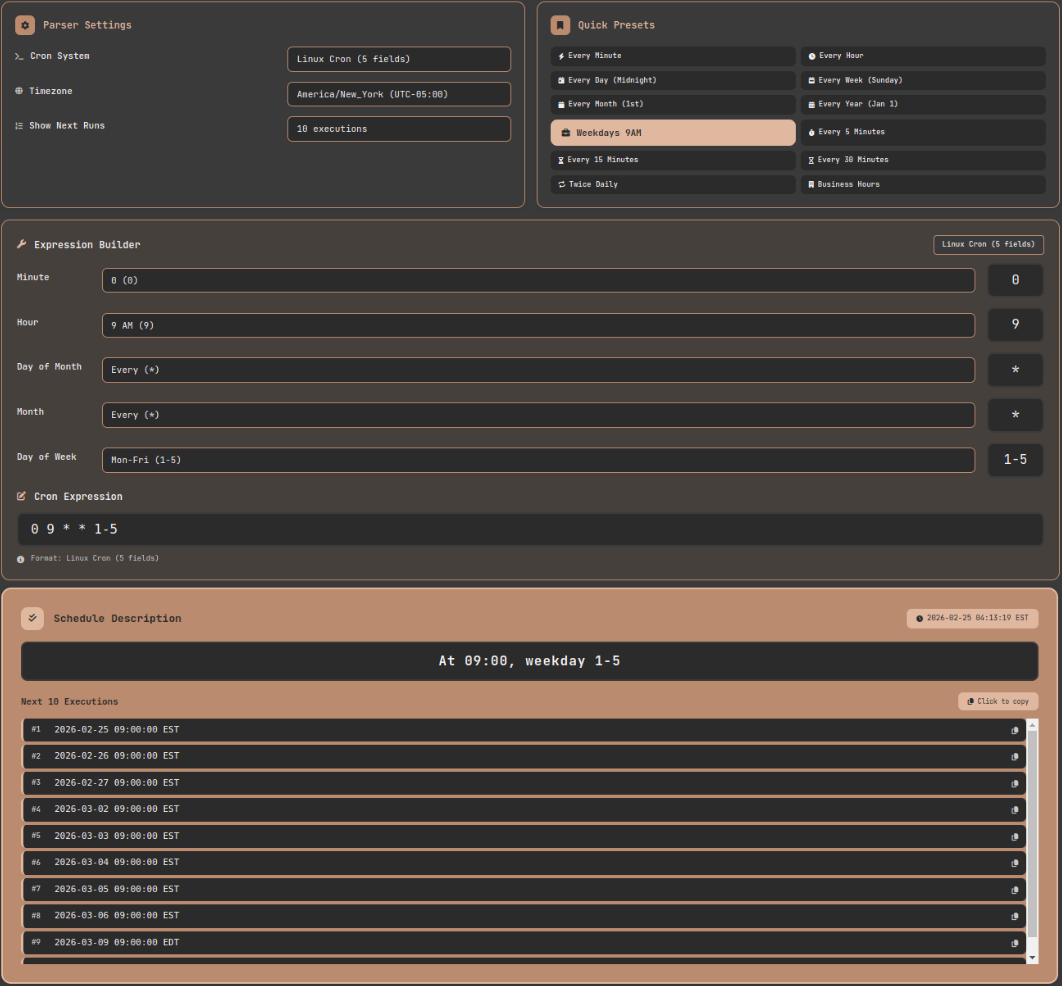
Cron Expression Parser: Validating a weekday 9 AM schedule with America/New_York timezone — EDT or EST is automatically applied depending on DST status
Example 2: Validating the Same Schedule in Quartz Format
Now suppose you need to apply the same schedule from Example 1 to a Spring Boot application's @Scheduled annotation, which requires Quartz format.
- Linux expression:
0 9 * * 1-5(weekdays at 9 AM) - Quartz equivalent:
0 0 9 ? * MON-FRI
- Switch Cron System →
Quartz/Spring (6-7 fields) - Enter the converted expression
0 0 9 ? * MON-FRI - Confirm the execution times still show 09:00:00 — now with a second field (0) prepended
- Verify that the day-of-month field is
?, meaning the schedule is driven by day-of-week only - Compare with Example 1 to confirm both expressions produce identical execution times
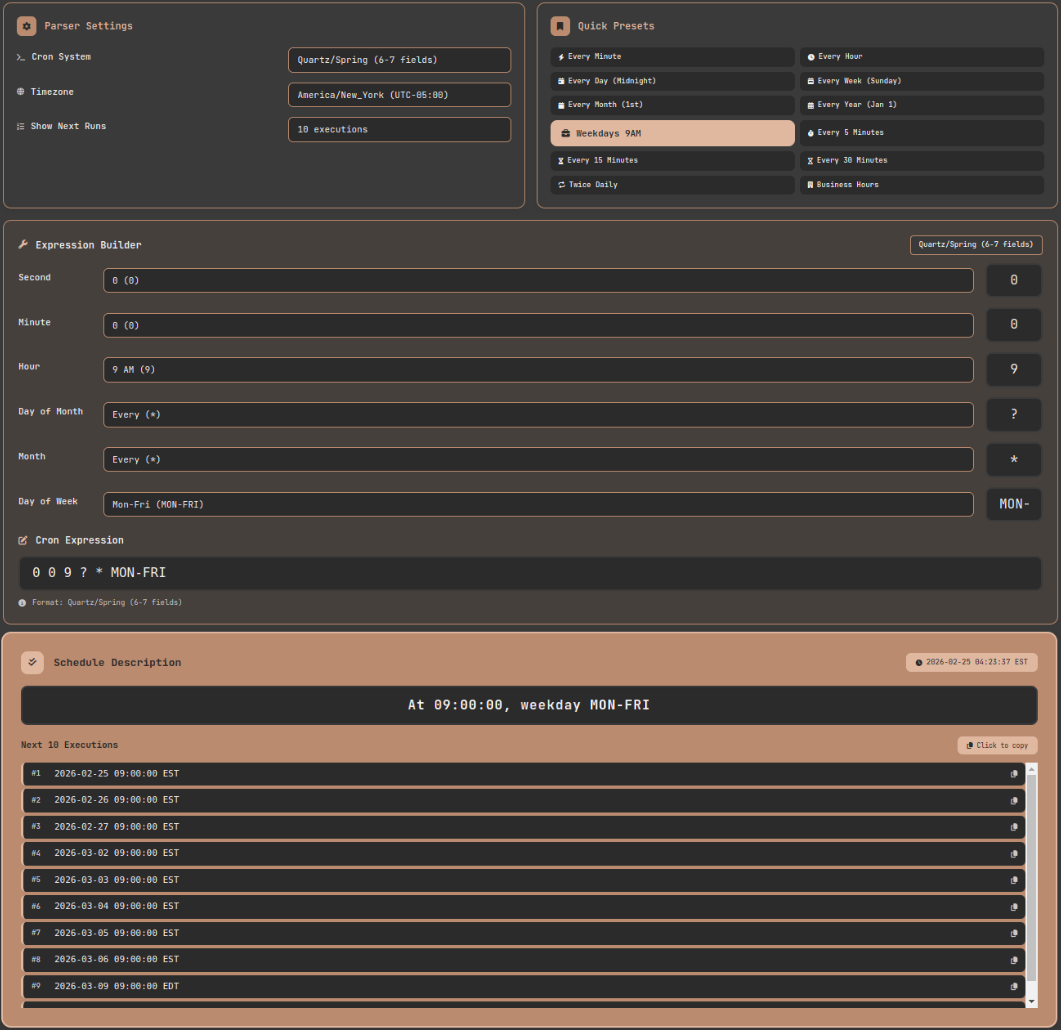
Quartz mode validation: Confirming that Linux Cron's 0 9 * * 1-5 and Quartz's 0 0 9 ? * MON-FRI produce identical execution times
Real-World Problems and Solutions
Problem 1: Scheduling the Last Day of Every Month
February has 28 days (29 in a leap year), some months have 30, others 31 — which means "the last day of every month" cannot be expressed directly in standard Linux Cron syntax. Setting 0 0 31 * * simply won't run in months with fewer than 31 days (February, April, June, September, November).
The most common workaround is checking the date inside the script itself.
With Quartz, implementations that support the L character allow a clean expression like 0 0 0 L * ?. However, not all Quartz implementations support L, so always check the documentation for the specific library you're using.
Problem 2: When Execution Time Exceeds the Interval
If a Cron job scheduled at */5 * * * * (every 5 minutes) takes 7 minutes to complete, a new instance starts before the previous one finishes. This concurrent execution problem leads to duplicate database records, file conflicts, and other serious side effects.
On Linux, the standard solution is a lock file using flock.
The -n flag makes the lock non-blocking — if the lock is already held by a running instance, the new invocation exits immediately. In Kubernetes, concurrencyPolicy: Forbid on a CronJob serves the same purpose.
Problem 3: Handling Missed Jobs After a Restart
When a server restart or Cron daemon downtime causes scheduled jobs to be skipped, you need to decide whether to run the missed jobs or skip them. Traditional Linux Cron defaults to skipping. Anacron can run missed jobs after a restart, but it isn't suitable for schedules with minute-level or finer precision. If catch-up execution is a hard requirement, it's worth evaluating Quartz's MisfireInstruction settings or a full workflow orchestrator like Apache Airflow.
Cron and the Modern Scheduling Ecosystem
Understanding which Cron dialect each platform uses prevents a whole category of subtle bugs.
- AWS EventBridge: Uses a Quartz-like 6-field format but is not identical. The day-of-week field accepts 1–7 or SUN–SAT (1 = Sunday; 0 is not supported), and a year field is available. Consult the official documentation.
- GitHub Actions: Standard Linux Cron 5-field format. Runs in UTC only — timezone support is not available.
- Kubernetes CronJob: Standard Linux Cron 5-field format. Follows the cluster controller's timezone. As of Kubernetes 1.27, the
spec.timeZonefield is supported. - Spring
@Scheduled: Quartz Cron 6-field format. Timezone can be specified via thezoneattribute.
Because each platform applies its own subtle variations, always cross-reference the platform's official documentation and verify results with an actual parser tool before deploying.
Pro Tips: How to Handle Cron Safely
Always validate with a tool. No matter how carefully you reason through an expression mentally, the actual execution times can still surprise you. Entering the expression into a tool like the Cron Expression Parser and visually confirming 10–20 upcoming execution times should be a mandatory pre-deployment step.
Store in UTC, display in local time. Just as with Unix timestamps, defining Cron schedules in UTC and running servers on UTC eliminates an entire class of DST-related incidents at the architectural level.
Distribute execution times. Concentrating all Cron jobs at 0 * * * * (the top of every hour) creates sudden spikes in server load. Intentionally spreading jobs across different minutes — 7 * * * *, 23 * * * * — smooths out resource usage.
Log everything. Redirecting Cron output to a log file makes post-incident analysis dramatically easier.
Comment your crontab. Write a comment above each entry explaining its purpose, owner, and the date it was added — for the benefit of your future self and your colleagues.
Closing: The Depth Behind Five Asterisks
My introduction to crontab began with a single sentence: "five asterisks runs every minute." That sentence is correct, but I've learned through experience that truly mastering Cron in production requires understanding timezones and DST, the differences between Linux Cron and Quartz, concurrent execution prevention, and the dialect variations across platforms.
This deceptively simple scheduling language — now nearly half a century old — survives in cloud, container, and serverless environments because of the balance it strikes between conciseness and expressiveness. The next time you write a Cron expression, use the Cron Expression Parser to verify the actual execution times before deploying. Only by confronting the complexity hiding behind five asterisks can you confidently push that deployment button.
References
- Paul Vixie — Vixie Cron Source Code and Documentation — The original source of the Linux standard Cron implementation
- Vixie Cron crontab(5) man page — crontab(5) - Linux man page — Official reference documenting the 0/7 dual-Sunday behavior and other Vixie Cron rules
- Quartz Scheduler — CronTrigger Tutorial — Official Quartz Cron expression documentation
- AWS — EventBridge Scheduler Cron expressions — Official reference for AWS's Cron dialect
- Kubernetes — CronJob Documentation — Official Kubernetes CronJob resource documentation