The way computer systems handle time is fundamentally different from how we read a calendar. We say "February 21, 2026 at 3:00 PM," but a computer represents that exact moment as a single integer. That integer is the Unix Timestamp. In this post, we'll explore the historical context, technical principles, and the real-world complexities developers encounter — all hidden behind what appears to be a simple number. If you'd like to follow along hands-on, try the Unix Timestamp Converter I built.
Why January 1, 1970? The Birth of the Epoch
When I first learned programming and studied what the time() function actually returns, a natural question came to mind: "Why 1970? That's not when computers were invented."
The answer lies in the history of Unix. In 1969, Ken Thompson and Dennis Ritchie at AT&T Bell Labs began developing the Unix operating system. To represent time internally, they defined a single integer as the number of seconds elapsed from a fixed reference point. That reference — close enough to be practical, round enough to be elegant — was set to January 1, 1970 at 00:00:00 UTC.
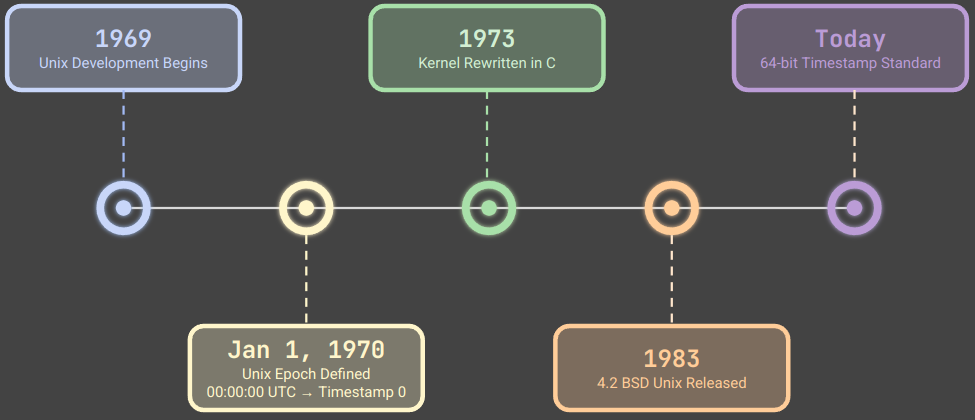
Unix Development Timeline: From Bell Labs (1969) to the Modern 64-bit Standard
According to the POSIX standard (IEEE Std 1003.1), a Unix timestamp is officially defined as "the number of seconds elapsed since the Epoch — January 1, 1970, 00:00:00 UTC." This deceptively simple definition has become the universal language of time across billions of devices worldwide.
The original implementation used a 16-bit integer, but its range proved too limited and was quickly extended to 32 bits. That decision would leave behind a ticking time bomb — the Year 2038 Problem — which we'll explore later.
The Structure of a Timestamp: Elegance in Simplicity
The core beauty of Unix timestamps is their absolute simplicity. Representing all time as a single integer makes comparison, sorting, and arithmetic remarkably straightforward.
Simple addition and subtraction are all you need for date arithmetic. In databases, querying records within a time range with WHERE created_at BETWEEN 1740124800 AND 1740211200 is a highly efficient integer comparison — no string parsing, no format conversion.
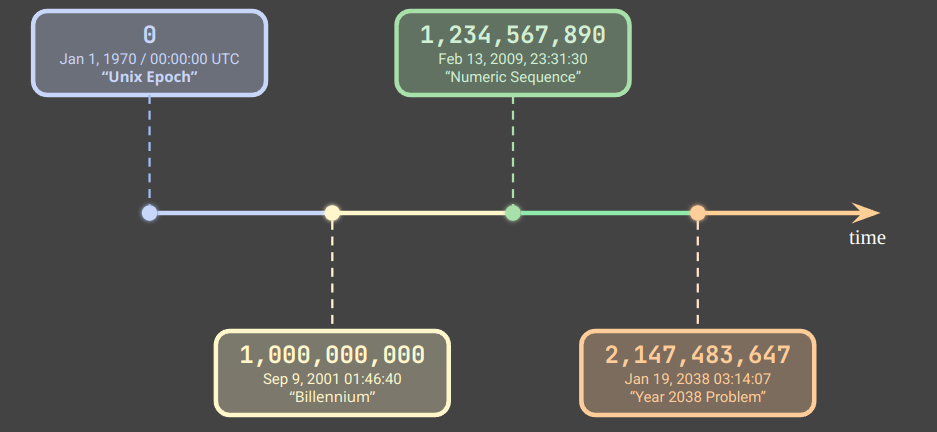
Unix Timestamp Number Line: From the Epoch (0) to the 32-bit Maximum (2,147,483,647)
Seconds vs. Milliseconds: A Common Source of Bugs
One of the most frequent sources of confusion in practice is the mixing of second-based and millisecond-based timestamps. JavaScript's Date.now() returns milliseconds, while Python's time.time() returns seconds (as a float).
A practical rule of thumb: a 13-digit number is almost certainly in milliseconds; a 10-digit number is in seconds. Early in my career, I passed a JavaScript-generated timestamp directly into server-side Python code without dividing by 1000. The resulting date calculations were completely wrong, and it took several frustrating hours to track down the cause — a single missing division.
Timezones and DST: The Real Complexity of Timestamps
Unix timestamps are always UTC. But the real world operates on timezones, and that's where many developers encounter unexpected bugs.
The IANA Timezone Database
The world contains more than 600 named timezones registered in the IANA (Internet Assigned Numbers Authority) Timezone Database. A simple UTC±N offset is not enough — the database tracks historically changed timezone rules, Daylight Saving Time (DST) transition dates, and the fact that different countries apply DST differently.
America/New_York, for example, transitions between EST (UTC−5) and EDT (UTC−4) twice a year. If a developer doesn't account for these transitions carefully, serious bugs can emerge — I once spent an entire debugging session on an e-commerce project because a promotion's end time fell on the exact night DST ended in the US Eastern timezone, causing the 23:00–23:59 window to occur twice.
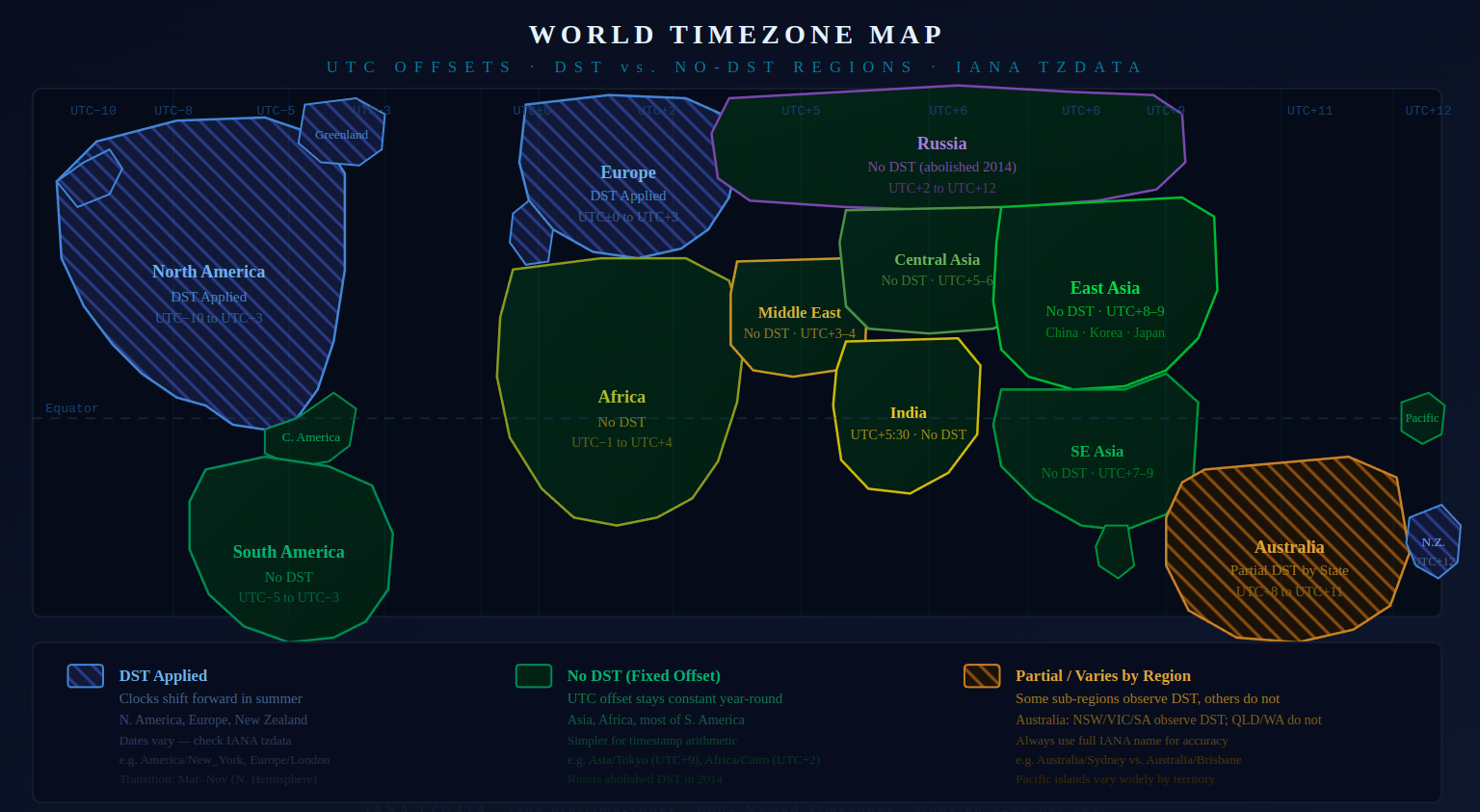
World Timezone Map: DST Applied Regions (blue stripes), No-DST Fixed-Offset Regions (green), and Partial/Variable DST Regions (orange stripes)
Practical Guide: Using the Unix Timestamp Converter
When applying theory to real work, the Unix Timestamp Converter makes it easy to move quickly between timestamps and human-readable dates.
Example 1: Interpreting a Timestamp from an API Response
Converting a raw timestamp from a REST API response into a readable date:
- Open the converter
- Input Settings: Set Input Type →
Unix Timestamp - Add Output:
- Output Type →
Date & Time - Timezone → select your target timezone (e.g.
Asia/Seoul) - Format →
Mon DD, YYYY, hh:mm:ss AM/PM - Click Add Output
- Output Type →
- Enter input value:
1700000000 - Read result:
Nov 15, 2023, 07:13:20 AM
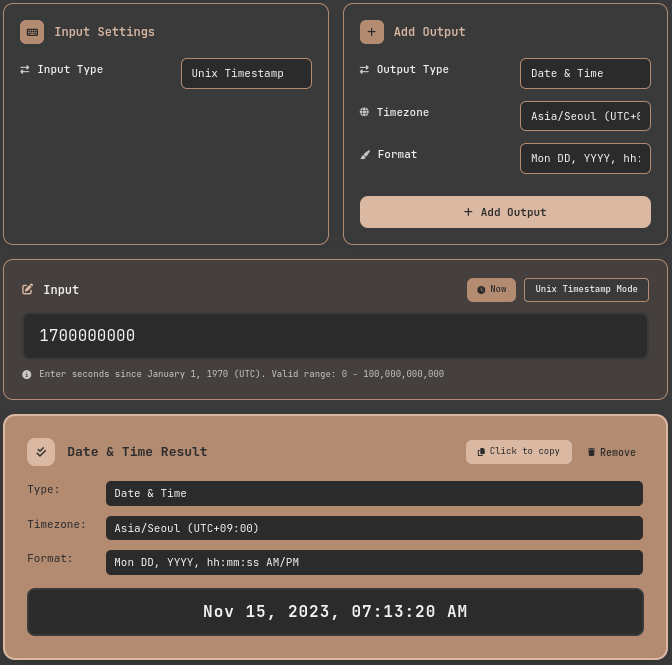
Unix Timestamp Converter: Converting timestamp 1700000000 to a local date and time (Asia/Seoul)
A particularly useful feature is the ability to add multiple outputs simultaneously. When developing an international service that needs to compare times across Seoul, New York, and Tokyo, you can add separate output panels for each timezone and see all results side by side from a single input value.
Example 2: Converting a Date to a Timestamp (Deployment Scheduling)
In automated deployment pipelines, you sometimes need a Unix timestamp for a specific scheduled time:
- Input Settings: Set Input Type →
Date & Time - Timezone: In Input Settings, select
America/New_York - Add Output: Set Output Type →
Unix Timestamp, then click Add Output - Enter date/time:
02/20/2026, 09:00:00 PM - Read result:
1771639200— click the result field to copy it to the clipboard
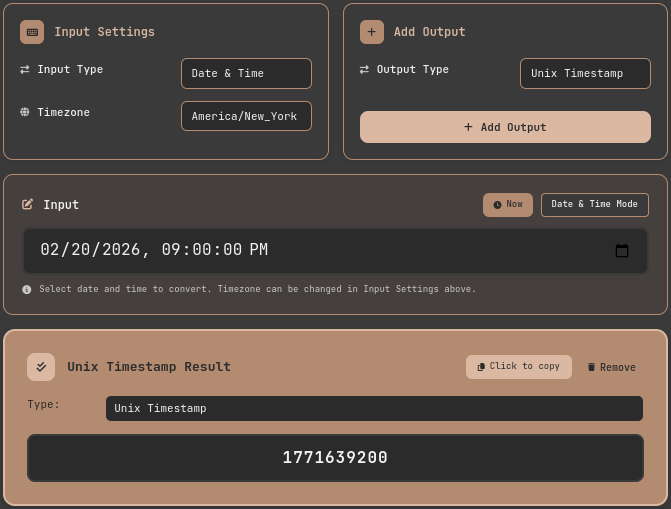
Unix Timestamp Converter: Converting a scheduled datetime (America/New_York) to a Unix timestamp for deployment automation
The Year 2038 Problem: History Repeating Itself
If you remember Y2K, the Year 2038 Problem will feel familiar — though technically, it is far more straightforward.
The maximum value of a signed 32-bit integer is 2,147,483,647. That value corresponds exactly to January 19, 2038 at 03:14:07 UTC. When a 32-bit system's clock reaches this point, the timestamp overflows into a negative number, and the interpreted date wraps back to December 13, 1901.
As noted by OpenBSD security advisories, this is not just a legacy code problem. Embedded systems, industrial control equipment, and network device firmware with long update cycles face real risk. The solution is well-established: 64-bit timestamps extend the representable range to roughly 292 billion years. The Linux kernel began transitioning 32-bit platforms to 64-bit time_t starting around 2012 (Linux kernel time64_t transition), and modern 64-bit systems are already safe. The converter tool featured in this post also uses 64-bit integers internally and is not affected by this problem.
Leap Seconds: Why Unix Timestamps Aren't Perfect
There is one lesser-known fact about Unix timestamps: they ignore leap seconds.
Earth's rotation is not perfectly constant, causing a gradual divergence between astronomical time (UT1) and atomic-clock-based Coordinated Universal Time (UTC). To correct this, the International Earth Rotation and Reference Systems Service (IERS) periodically inserts one-second adjustments called leap seconds. From 1972 through 2024, 27 leap seconds have been added in total.
Unix timestamps treat every day as exactly 86,400 seconds. When a leap second is inserted, the timestamp either repeats the same value twice (leap smearing) or skips it entirely, depending on the system's implementation. This can cause subtle discrepancies in cross-system time synchronization.
For most applications, a 27-second drift is insignificant. But for financial trading systems, scientific instrumentation, or any domain requiring sub-second precision across distributed systems, this distinction matters.
Timestamp Formats and International Standards
When developers exchange date and time data, two standards have emerged as the dominant choices.
ISO 8601: Readable by Humans and Machines Alike
ISO 8601 is the international standard for representing dates and times, defining formats like 2026-02-21T15:30:00+09:00. Its key advantage is that it embeds timezone offset information, and crucially, alphabetical string sorting and chronological sorting produce identical results — which makes it especially safe to use in logs and databases without additional parsing.
RFC 3339: ISO 8601 Profiled for Internet Use
RFC 3339 is a stricter profile of ISO 8601 designed specifically for internet protocols. The Google API Design Guide, GitHub API, and AWS timestamp formats all follow RFC 3339. When designing a REST API, the choice typically comes down to RFC 3339 strings versus Unix integers. My personal preference is ISO 8601 / RFC 3339 for any field that humans will read or debug, and Unix timestamps for internal processing where performance matters.
Practical Patterns: Handling Timestamps Correctly
These are the principles I've settled on after debugging timestamp-related issues across multiple production systems.
Store in UTC, display in local time. This single rule prevents the majority of timezone-related bugs. Store UTC timestamps in the database and convert to local timezone only at the presentation layer.
Document the unit explicitly. Specify whether a timestamp field is in seconds or milliseconds in every function signature and API contract. Encoding the unit in the name — such as created_at_ms — is a simple, effective convention.
Test edge cases. DST transition times, year boundaries, and February 29 on leap years are where time-related logic most often breaks. Include these boundary values in automated tests.
Default to 64-bit. When designing new systems, use int64 or BIGINT from the start to avoid the Year 2038 Problem entirely. In MySQL, the TIMESTAMP type is affected, but DATETIME and BIGINT are not.
Conclusion: The Philosophy of Time in a Single Number
Unix timestamps began with a remarkably simple idea: "how many seconds have passed since a fixed point?" Everything follows from representing that answer as a single integer.
But behind that simplicity lies decades of accumulated real-world complexity — timezones, DST transitions, leap seconds, seconds-versus-milliseconds confusion, and 32-bit overflow. Developers who understand these layers debug faster and build more robust systems than those who treat timestamps as opaque numbers.
The next time you encounter 1740124800 in a log file, or need to interpret a timestamp from an API response, open the Unix Timestamp Converter and convert it directly. As you move back and forth between numbers and dates, the computer's model of time becomes intuitive rather than abstract.
References
- POSIX Standard — IEEE Std 1003.1: System Interfaces — Official definition of Unix timestamps and the
time()function specification - IANA Timezone Database — Time Zone Database (tzdata) — Global timezone rules and DST transition date database
- RFC 3339 — Date and Time on the Internet — Standard date/time format for internet protocols
- Linux Kernel Newbies — Y2038 time_t transition — Documentation of the Linux kernel's migration to 64-bit timestamps
- Python Official Docs — time — Time access and conversions — Standard library reference for handling Unix timestamps in Python