Computers only understand numbers. Every character we type, every symbol, even emojis are stored internally as numbers. The most fundamental system for this conversion is ASCII (American Standard Code for Information Interchange). This article will deeply explore everything from the history of ASCII to its practical applications in real programming scenarios and modern extensions. You can verify and practice the content in real-time through the ASCII conversion tool I created.
The Birth of ASCII: Legacy of the Teletype Era
When I first learned programming, I wondered why the character 'A' has exactly the value 65. The answer goes back to the 1960s.
ASCII was established as a standard by the American Standards Association (ASA, now ANSI) in 1963 to solve the chaos in teleprinter communication at the time. Looking at the official history of ASCII, it was the product of international standardization efforts to solve problems caused by incompatible character encodings between different communication devices.
Early ASCII was a 7-bit system capable of representing a total of 128 characters. Why exactly 7 bits? It was a design that considered the constraints of communication technology at the time and the parity bit (1 bit) for error detection. Using 7 bits for data and 1 bit for error detection out of 8 bits was efficient.
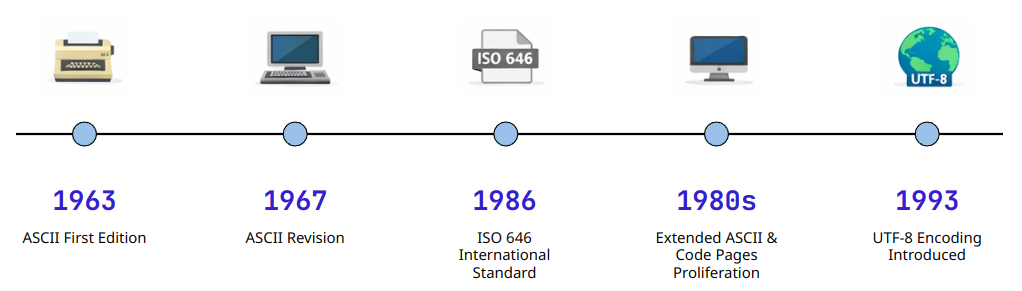
Historical Development of the ASCII Standard: From the Teletype Era to Modern Computing
Structure of the ASCII Table: Control Characters and Printable Characters
The ASCII table is broadly divided into three regions. Understanding this structure clarifies many programming situations.
Control Characters (0-31): Invisible Commands
When I first learned C, I was curious why \n (newline) and \t (tab) were treated specially. These are all escape representations of Control Characters.
Control characters originated from machine control commands in the teletype era:
- CR (Carriage Return, 13): Move the typewriter head to the beginning of the line
- LF (Line Feed, 10): Move the paper up one line
- BEL (Bell, 7): Ring the bell (notification)
This legacy remains today. Windows uses CRLF (13+10) for line breaks, while Unix/Linux uses only LF (10). I remember being confused when I first used Git and saw the warning: LF will be replaced by CRLF message—this was due to the difference in line break characters between operating systems.
Printable Characters (32-126): Everything We See
Starting from the space character (Space, 32), this range includes numbers (48-57), uppercase letters (65-90), lowercase letters (97-122), and various symbols.
The interesting point is the relationship between uppercase and lowercase letters. The difference between 'A' (65) and 'a' (97) is exactly 32. In binary, only the 5th bit differs:
Due to this regularity, early programming languages performed case conversion with a single bit operation. Looking at the C standard library's toupper/tolower implementation, you can see that this optimization is still utilized in modern times.
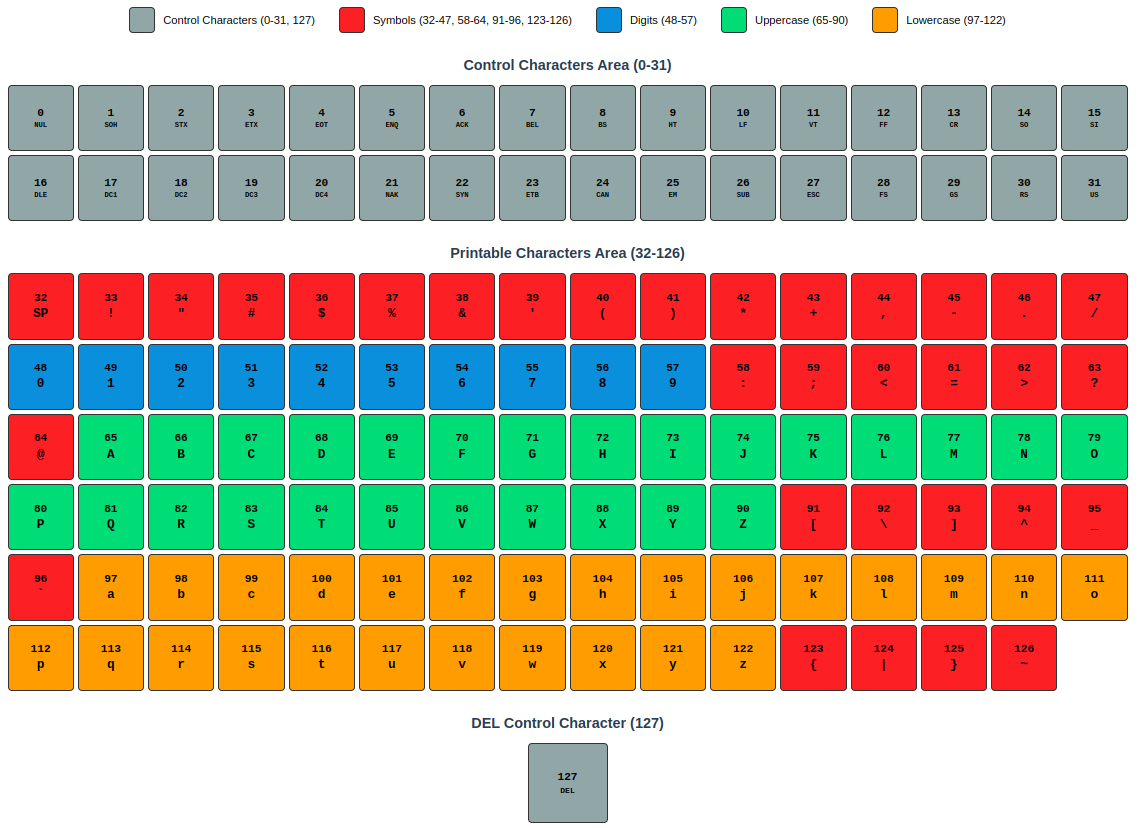
Structural Classification of the ASCII Table: Control Characters, Numbers, Uppercase Letters, Lowercase Letters, Symbols
Real-World Use Cases: Protocols and Data Processing
ASCII goes beyond simply representing characters—it has become the foundation of countless communication protocols and data formats.
Experience 1: HTTP Protocol Debugging
Early in web development, I encountered a strange bug while implementing a REST API. JSON data in POST requests was intermittently failing to parse. After analyzing packets with Wireshark, I found that some clients were sending only LF instead of CRLF for line breaks, and the server parser wasn't handling this properly.
What I realized was that HTTP headers are pure ASCII text-based, and as specified in RFC 7230, each header line must end with CRLF. I was able to solve the problem by checking the actual byte values with an ASCII conversion tool.
Experience 2: Serial Communication and Sensor Data
When implementing serial communication between Arduino and Raspberry Pi in an embedded project, I pondered how to transmit sensor data. The simplest method was to convert numbers to ASCII strings for transmission.
For example, to transmit a temperature sensor value of 23.5:
- Binary transmission: 4 bytes (float type)
- ASCII transmission: 4 bytes (
2,3,.,5)
The size is similar, but the advantage of the ASCII method is that debugging is easy. It's human-readable in the serial monitor. In fact, many industry standards like the NMEA 0183 protocol have adopted ASCII-based text protocols.
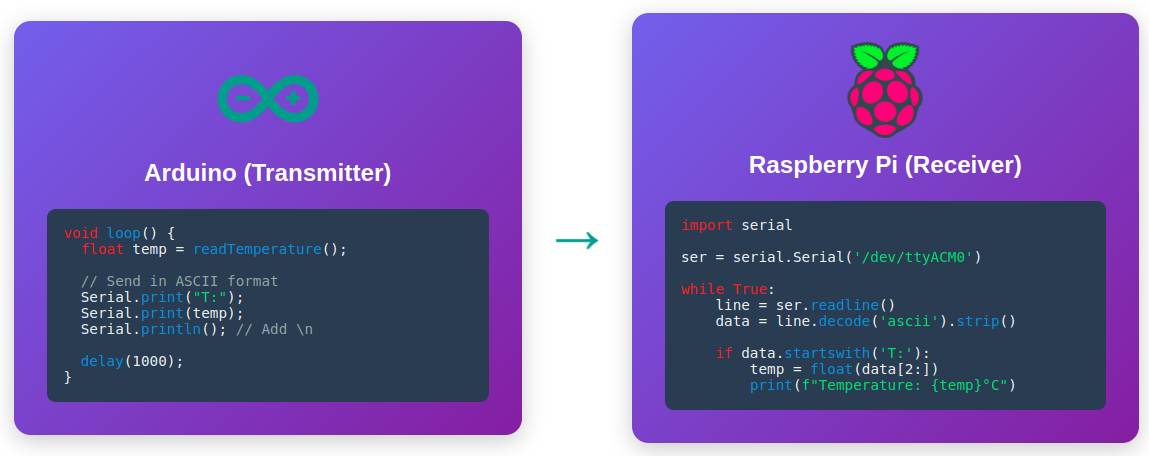
ASCII-Based Serial Communication: Readability and Debugging Convenience
ASCII Conversion Tool Usage Guide
Now that you understand the theory, let's see how to apply this in actual work. The ASCII conversion tool supports various conversion scenarios.
Practice 1: Convert String to Hexadecimal (Network Packet Analysis)
In network programming, when analyzing packet data, you often need to check strings as hexadecimal values.
- Access the ASCII conversion tool
- Set input format: Select Text
- Add output format:
- Output Type → Select ASCII
- Format → Select HEX
- Hex Style → Select 0x48
- Add Output
- Input: Enter
Helloin the Input field - Check result:
0x48 0x65 0x6C 0x6C 0x6F
This is the actual byte value transmitted over the network. It matches exactly with the hexadecimal dump seen in Wireshark.
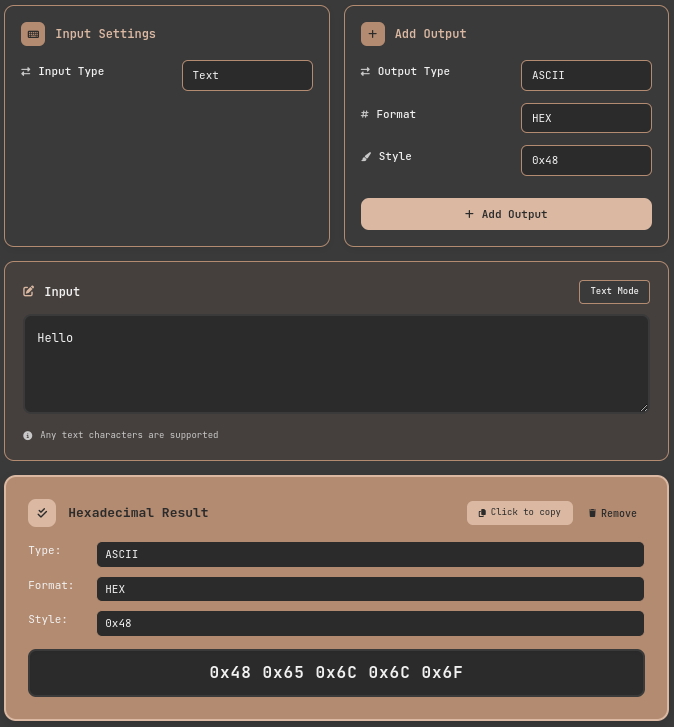
ASCII Conversion Tool: Converting Strings to Hexadecimal
Practice 2: Reverse Convert Hexadecimal Dump to String (Log Analysis)
Conversely, when you need to convert hexadecimal values recorded in log files into readable characters:
- Access the ASCII conversion tool
- Set input format
- Input Type → Select ASCII
- Input Format → Select HEX
- Add output format:
- Output Type → Select TEXT
- Add Output
- Input data: Enter
0x48 0x65 0x6C 0x6C 0x6F - Result:
Hellois automatically displayed
The tool supports various hexadecimal input formats:
0x48 0x65(standard format)\x48\x65(C/Python escape sequence)48656C6C6F(consecutive hexadecimal)
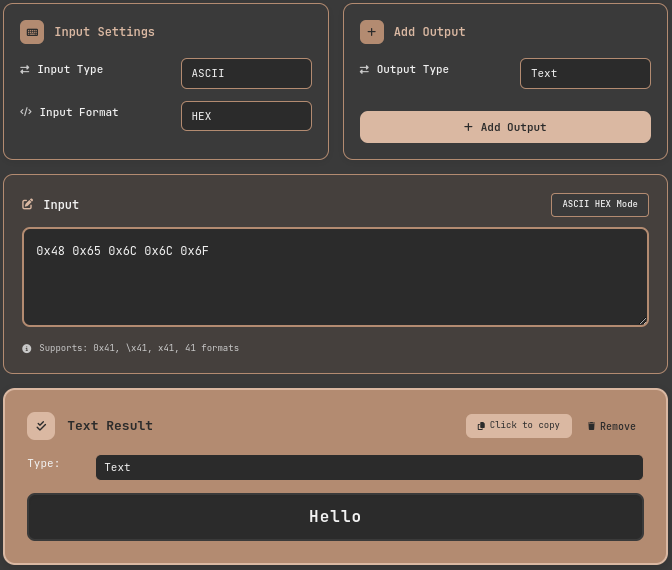
ASCII Conversion Tool: Reverse Converting Hexadecimal to String
Of course, you can add multiple Output formats and check multiple results at once by just changing the Input.
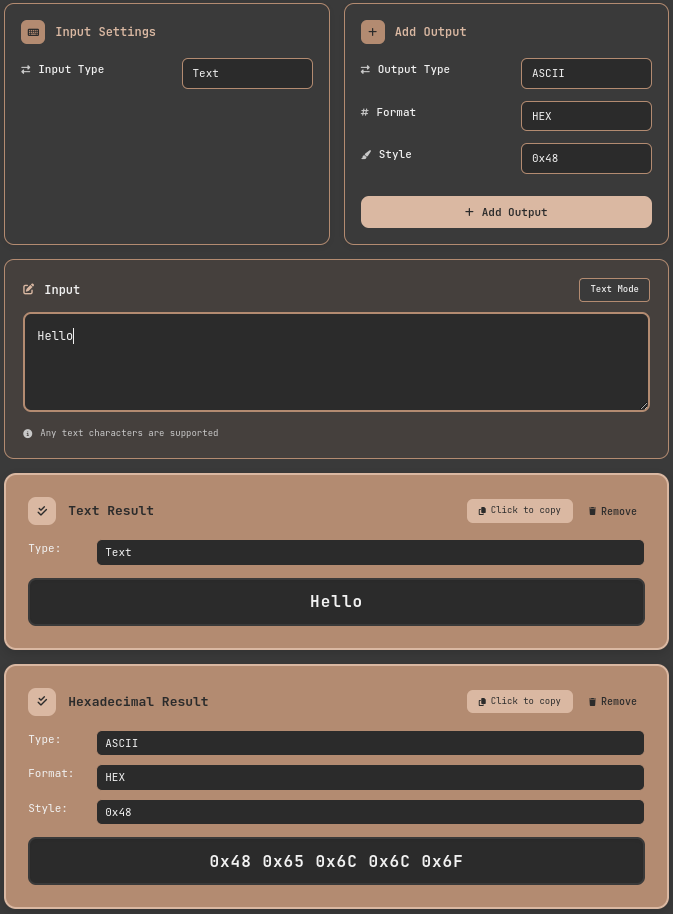
ASCII Conversion Tool: Multiple Output Results
Practice 3: Bit Pattern Analysis with Binary
Binary representation is essential when understanding or debugging bit-level operations.
- Access the ASCII conversion tool
- Set input format: Select Text
- Add output format:
- Output Type → Select ASCII
- Format → Select BINARY
- Hex Style → Select 0b01000001
- Add Output
- Input: Enter
Ain the Input field - Check result:
0b01000001
In binary, you can clearly see that case conversion is the difference of one bit, the 5th bit:
A→0b01000001a→0b01100001
Extended ASCII and Limitations: The Wall of Internationalization
Since ASCII was an English-centric standard, it had limitations in representing other languages. 128 characters couldn't express characters from around the world.
Extended ASCII (128-255)
Using all 8 bits allows for an additional 128 characters. This is called Extended ASCII or High ASCII. The problem was that the allocation of these 128 characters was not standardized.
- Latin-1 (ISO 8859-1): For Western European languages
- Windows-1252: Microsoft's Latin-1 extension
- IBM Code Page 437: Includes box-drawing characters from the DOS era
I experienced this confusion firsthand while analyzing ROM files of old games. The same byte values displayed as completely different characters depending on which code page was used.
The Emergence of UTF-8: A Solution for All Languages
What fundamentally solved the limitations of Extended ASCII is UTF-8. UTF-8 is perfectly compatible with ASCII (the first 128 code points are identical) while being able to represent all characters from around the world. Looking at the design principles of UTF-8, you can see how important this compatibility was as a design goal.
When I first worked on an internationalization (i18n) project, most issues with Korean, Chinese, and Japanese support were resolved just by switching to UTF-8. However, one thing to note is that while ASCII characters still occupy 1 byte in UTF-8, characters like Korean take up 3 bytes.
Performance and Optimization: A Practitioner's Perspective
The impact of ASCII conversion on performance varies depending on the type of application.
The Pitfall of String Processing
As a novice programmer, I wrote the following to do case-insensitive string comparison:
This code converts both strings to lowercase before comparing, creating new string objects each time. This causes serious performance degradation in large-scale data processing.
A more efficient method is to utilize ASCII code characteristics:
The bit operation (| 0x20) sets the 5th bit to 1, converting uppercase to lowercase. It's memory-efficient because it doesn't create new strings.
Considerations in Real-Time Systems
In environments where real-time performance is critical, like embedded systems or game engines, ASCII conversion is also a target for optimization. In a game project I participated in, we significantly improved performance by pre-converting strings to hash values and only performing hash comparisons at runtime.
Unreal Engine's FName system uses exactly this principle. It converts strings to unique integer IDs, making comparison operations O(1).
Conclusion: ASCII, the Alphabet of the Digital World
ASCII is a standard that's over 60 years old, but it still operates at the most fundamental layer of computer systems today. It's the foundation of technologies we use every day: HTTP headers, email protocols, configuration files, command-line interfaces, and more.
What I've learned from working on various projects over the years is that properly understanding ASCII makes debugging much easier. Many problems—strange byte values in network packets, file encoding issues, string processing bugs—ultimately originate at the ASCII level.
Practice is the best learning method. Open the ASCII conversion tool and try converting strings you frequently use into various formats. When you can read hexadecimal dumps and binary patterns start making sense to you, you've understood the essence of ASCII.
Additional Learning Resources
- ASCII Official Standard — ASCII Code - The extended ASCII table — Complete ASCII and Extended ASCII tables with history
- RFC 20 — ASCII format for network interchange — Standard for ASCII usage in network communication
- Joel on Software — The Absolute Minimum Every Software Developer Must Know About Unicode — The evolution process from ASCII to Unicode
- OWASP — SQL Injection Prevention Cheat Sheet — ASCII special characters and security